Spring Girl: Integrating Seasonal Character Assets into Professional Creative Workflows
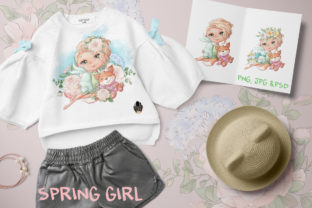
Seasonal transitions in marketing, publishing, and digital content creation require assets that are not only visually appealing but also technically versatile. The Spring Girl collection serves as a comprehensive resource kit designed to streamline the production of spring-themed materials for professionals ranging from freelance designers to small business owners. Rather than viewing these files as isolated illustrations, it is more effective to approach them as modular components within a larger design system. This specific set includes three PNG character files, two JPG character files, one PSD source file, dedicated seamless patterns, and floral frames, all rendered at 300 DPI to ensure viability across both digital and print mediums.
Understanding where this asset pack fits into your broader operational workflow is essential for maximizing return on investment. For educators creating seasonal curriculum supplements, marketers launching Easter or Mother’s Day campaigns, or stationery designers planning quarterly product lines, Spring Girl acts as a foundational visual anchor. The inclusion of multiple file formats addresses distinct stages of the creative process: the PSD allows for deep customization during the concept phase, the high-resolution PNGs facilitate rapid composition during execution, and the JPGs serve as lightweight references or web-optimized finals. By organizing these assets according to their function in your pipeline, you reduce friction between ideation and final output.
Pre-Production Planning and Asset Preparation
Efficient integration begins before opening any design software. Professionals should treat the acquisition of Spring Girl as an inventory management task. Before starting a project, verify that the 300 DPI resolution aligns with your intended output specifications. While 300 DPI is the industry standard for commercial printing, ensuring your canvas size matches the pixel dimensions of these assets prevents upscaling artifacts later in the process. For those working on large-format signage or packaging, this verification step is critical to maintaining quality control.
File organization is equally important for long-term usability. Instead of leaving the downloaded files in a generic folder, integrate them into your existing digital asset management (DAM) structure. Tag the three PNG characters with metadata such as "spring," "character," "girl," "floral," and "transparent background." Tag the PSD file as "editable" or "source." This preparation ensures that when you or a team member searches for spring assets six months from now, the retrieval process is instantaneous. Consistent naming conventions and tagging transform a static download into a searchable, reusable library component.
During the planning phase, also consider color profiling. Since this set includes a PSD file, open it first to check the color mode (CMYK vs. RGB). If your workflow is strictly digital but the source file is CMYK for print, convert a working copy to RGB immediately to prevent color shifting in screen-based deliverables. Establishing these technical parameters upfront eliminates costly revisions during the final approval stages.
Execution Strategies Across File Formats
The true value of this collection lies in the strategic application of its varied formats during the active design phase. Each file type supports different workflow needs, and understanding these distinctions enhances productivity.
Leveraging the PSD for Customization
The single PSD file included in this set is your primary tool for adaptation. In professional workflows, stock characters often fail because they feel disconnected from a brand's specific identity. Use the layered PSD to adjust skin tones, hair colors, or clothing elements to match client guidelines or personal branding palettes. Because the file retains layer integrity, you can isolate specific elements—such as removing a flower basket or changing a dress pattern—without destructive editing. This capability extends the lifespan of the asset, allowing one base character to serve multiple variations across a campaign.
Rapid Composition with PNG Assets
The three PNG character files are optimized for speed and flexibility. Their transparent backgrounds make them ideal for composite work where time is a constraint. When designing social media templates, email headers, or website banners, these PNGs allow for non-destructive layering over colored backgrounds or photography. For entrepreneurs managing their own marketing, this format reduces the technical barrier to entry; no advanced masking skills are required to achieve a professional look. Keep these files accessible in your template libraries so they can be dropped into recurring designs without re-exporting or re-processing.
Utilizing Seamless Patterns and Frames
The two seamless pattern PNGs and floral frame JPG/PNG serve as structural design elements rather than focal points. In workflow terms, these are your texture and boundary tools. Use the seamless patterns to create custom backgrounds for stationery, wrapping paper, or textile mockups. Because they are seamless, they can be tiled infinitely without visible repetition lines, which is crucial for surface pattern design. The floral frames provide instant hierarchy and focus; use them to delineate text areas in certificates, invitations, or blog post featured images. These supporting assets ensure that the main character illustrations have context and visual breathing room.
Integration with Broader Design Ecosystems
Spring Girl does not exist in a vacuum. Successful implementation requires understanding how these assets interact with other tools and resources in your stack. For users of Canva, Affinity Designer, or Procreate, the PNG and JPG files offer plug-and-play compatibility. However, for Adobe Creative Cloud users, the PSD enables smart object linking. You might place the PSD into an InDesign layout for a brochure; if you update the original PSD to change a color, the linked instance in InDesign updates automatically. This linked workflow maintains consistency across multi-page documents and significantly reduces version control errors.
Consider how these assets pair with typography and complementary graphics. The soft, illustrative style of Spring Girl typically pairs best with rounded serifs, hand-lettered scripts, or clean sans-serifs. Avoid overly industrial or grunge typefaces unless intentionally aiming for contrast. When combining these characters with other stock elements, maintain consistent lighting direction and shadow density. If the Spring Girl characters are lit from the top-left, ensure other composited elements share that light source. This attention to environmental consistency distinguishes professional-grade composites from amateur collages.
For educators and content creators, these assets integrate smoothly into presentation software and learning management systems. The 300 DPI resolution means you can zoom in on details during live teaching or high-definition video recording without pixelation. When exporting slides or videos, however, remember to downsample appropriately to manage file sizes while retaining visual clarity. Balancing quality and performance is key to user experience in digital learning environments.
Quality Control and Post-Production Considerations
Maintaining professional standards requires rigorous quality checks after integrating Spring Girl into your projects. Always proof physical prints at actual size before approving bulk orders. Colors that appear vibrant on an RGB monitor may shift when converted to CMYK for print; utilize the PSD file to make targeted color corrections based on printed proofs. For digital outputs, test transparency rendering across different browsers and devices. Some older email clients do not support PNG transparency well; in those cases, have a flattened JPG fallback ready using the provided JPG assets.
Licensing and usage rights must also be factored into your post-production checklist. Ensure your intended use case aligns with the license terms associated with this collection. If you are creating products for resale versus internal marketing, the permissible applications may differ. Documenting usage rights alongside your asset metadata protects your business from future compliance issues. For freelancers delivering work to clients, include a usage guide specifying what they can and cannot do with the Spring Girl assets post-delivery.
Finally, evaluate the efficiency gains after completing your first project with this set. Did the pre-made frames reduce layout time? Did the editable PSD eliminate the need for custom illustration? Gathering this data helps refine future asset procurement decisions. If Spring Girl proved highly efficient, consider building out a complementary seasonal library using similar criteria: mixed formats, high resolution, and editability. Over time, this systematic approach to asset selection builds a robust, interoperable resource library that accelerates production cycles and elevates output quality consistently.
By treating Spring Girl as a functional component of your creative infrastructure rather than mere decoration, you unlock its full potential. The combination of editable sources, ready-to-use compositions, and structural patterns supports diverse workflows across industries. Whether you are streamlining seasonal marketing, enhancing educational materials, or developing retail products, the technical versatility of this 300 DPI collection provides the reliability and adaptability that professional projects demand. Success lies not just in the aesthetic appeal of cute girls and floral motifs, but in the disciplined integration of these assets into efficient, scalable, and quality-focused processes.