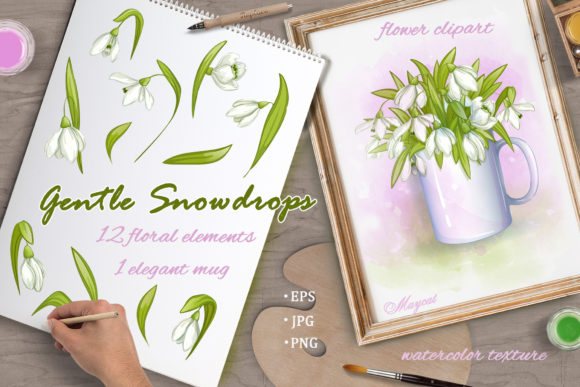
Gentle Snowdrops: Versatile Floral Design Assets
Snowdrops are among the first flowers to emerge from the frozen earth, signaling resilience and new beginnings. In digital design, capturing this specific blend of fragility and strength requires assets that feel organic rather than manufactured. The Gentle Snowdrops collection provides exactly this aesthetic foundation. It is more than a simple clipart pack; it is a comprehensive toolkit designed for creators who need high-resolution, layered floral elements that maintain their integrity across various media. Whether you are designing spring packaging, creating social media templates, or building website backgrounds, these assets offer the technical quality and artistic nuance required for professional results.
The Aesthetic Value of Early Spring Botanicals
The visual language of snowdrops is distinct. Unlike the bold saturation of summer blooms or the warm tones of autumn foliage, snowdrops rely on subtle contrast. They are defined by white petals against cool greens and textured backgrounds. This makes them exceptionally versatile for designers working with minimalist, Scandinavian, or cottagecore aesthetics. The grace and freshness inherent in these illustrations suit any season, but they are particularly effective when you need to convey purity, hope, or natural elegance without overwhelming the viewer.
For marketers and bloggers, this subtlety is an asset. Busy visuals often distract from copy or calls to action. The isolated flowers and leaves in this set provide negative space naturally, allowing text to breathe while still adding organic warmth to a layout. The watercolor texture adds a tactile quality that flat vector graphics often lack, bridging the gap between digital precision and hand-painted authenticity.
Practical Applications Across Creative Disciplines
Different creative professionals face unique challenges when integrating floral elements. The Gentle Snowdrops set addresses these varied needs through its diverse file formats and composition options.
- Surface Pattern Design: The included seamless pattern (available in both EPS10 and high-resolution JPG) serves as an immediate solution for textile printing, wrapping paper, or digital scrapbooking. Because it is truly seamless, it can be tiled infinitely without visible repetition lines, making it ideal for large-format print projects.
- Social Media Content Creation: Bloggers and influencers can utilize the 13 individual PNG elements to build custom frames for Instagram Stories or Pinterest pins. The transparent backgrounds at 300dpi ensure that overlays look crisp on high-density mobile screens while remaining lightweight enough for fast loading.
- Product Packaging: Small business owners selling candles, soaps, or stationery can use the pre-arranged bouquet in the white mug as a central label motif. The textured watercolor background version works beautifully for box liners or thank-you cards, adding a premium unboxing experience.
- Educational Materials: Educators creating worksheets or presentation slides can use the isolated elements to create bullet points or section dividers that are engaging for students but not childish. The realistic botanical style respects the intelligence of adult learners while maintaining visual interest.
Technical Flexibility for Professional Workflows
A beautiful illustration is useless if it cannot be adapted to a specific project's technical constraints. This collection prioritizes workflow efficiency by providing multiple entry points for different software ecosystems. Understanding how to leverage these specific files can significantly reduce production time.
Vector Editing and Scalability
The inclusion of EPS10 files with layered organization is critical for print designers. While PNGs are excellent for digital use, vectors allow for infinite scaling without pixelation. If you are designing a billboard or a tiny business card, the EPS source ensures line quality remains consistent. Furthermore, the layered organization within the EPS file means you can recolor individual petals, adjust leaf placement, or remove specific elements entirely to create a derivative work that matches your brand palette perfectly. This editability transforms a static asset into a dynamic design system.
Raster Compositing and Texture Control
For those working primarily in Photoshop or Affinity Photo, the PSD file offers advanced control over blending modes. Watercolor textures can sometimes look muddy when placed over colored backgrounds. By having access to adjustment layers and specific blending mode settings for the background, you can integrate the snowdrop composition seamlessly into dark mode websites or vibrant marketing banners. The 5000x5000 pixel JPG files provide ample resolution for cropping and zooming, ensuring that even detailed close-ups retain their painterly grain.
Building Cohesive Designs with Isolated Elements
One of the greatest advantages of having 13 separate floral elements is the ability to create original arrangements. Pre-made bouquets are convenient, but custom compositions demonstrate higher creative effort and brand alignment. Here is a practical approach to utilizing the isolated PNGs effectively:
- Establish Hierarchy: Select one or two larger flower elements to serve as focal points. Use smaller buds and leaves to lead the eye toward your text or product image.
- Mind the Negative Space: Snowdrops have long, arching stems. Use these natural curves to frame content rather than block it. The "C" shape formed by a stem is perfect for cradling a quote or logo.
- Vary Opacity and Scale: Even with high-quality PNGs, placing identical elements side-by-side can look repetitive. Rotate, flip, and slightly resize individual flowers to mimic natural growth patterns. Lowering the opacity of background leaves can create depth of field, pushing them visually behind your main subject.
- Color Grading Consistency: Since these are watercolor illustrations, they may carry subtle color casts. When combining them with other assets, apply a unified color grade or gradient map adjustment layer to ensure the snowdrops harmonize with your overall design scheme.
Adapting for Seasonal and Evergreen Content
While snowdrops are botanically tied to late winter and early spring, their design utility extends year-round. The key lies in context and color pairing. For spring campaigns, pair the Gentle Snowdrops assets with pastel blues, soft yellows, and fresh greens to emphasize renewal. However, for winter holiday designs, combine them with deep evergreens, gold foil textures, and rich burgundies. The white of the snowdrop acts as a neutral highlight that pops against dark, festive backgrounds just as effectively as it does against light, airy ones.
For evergreen content, focus on the botanical accuracy and watercolor texture rather than seasonal connotations. Used in monochrome or duotone, these flowers become abstract textural elements suitable for corporate reports, wellness apps, or luxury branding where specific seasonality is irrelevant. The author’s floral arrangement in the white mug, for instance, evokes comfort and domesticity regardless of the month, making it a reliable staple for lifestyle brands.
Maximizing Asset Longevity
To get the most value from this collection, organize the files logically upon download. Keep the master EPS files in a dedicated "Source" folder for future editing, and export optimized PNGs or JPGs into project-specific folders as needed. Avoid repeatedly saving over the original high-resolution files. By treating Gentle Snowdrops as a modular design system rather than a single-use decoration, you ensure that these assets remain relevant across multiple campaigns and platforms. The combination of technical rigor and artistic sensitivity makes this set a sustainable resource for any creative library, capable of evolving alongside your design needs.